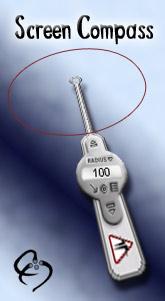
The Screen Compass allows you to measure the radius, circumference and area of circular or polygonal shapes on your screen simply and quickly. The Screen Compass floats above any other application so you can measure any angle on your screen.
The Screen Compass allows you to accurately measure the Radius, Circumference or Area of circular or polygonal shapes on your screen. The intuitive user interface allows you to quickly align the Compass by dragging it with the mouse, and fine adjustments can be made using the keyboard or nudge buttons.
This perfect compliment to the Screen Calipers and Screen Protractor, the Screen Compass is simple and easy to use with any program.
You may download the feature limited trial, and evaluate the Screen Compass for as long as you need to. By purchasing the full version you can unlock the software to measure radii greater than 100 pixels, and use the advanced features.
- Radius, Circumference and Area measurements
- Use keyboard controls to measure precisely
- Measure in pixels, inches or define your own units
- 37 different polygons to measure, including triangle, square and pentagon.
- Change the transparency to see through the Compass to what you're measuring
- 30 day money back guarantee
The Compass has a fully 'skinnable' interface. This means that you may download new skins and change the user interface. The Screen Compass comes with a technical skin allowing greater control and a crosshair for easy alignment. From aesthetic to technical you should find onscreen solution that suits your needs.
Unlike the compass that you may use on your drawing board the Screen Compass is not limited to simply drawing circles. Using the 'Shapes' menu you can choose to use a triangle, square, pentagon or any number of sided polygon up to the 39 sided Triacontakaienneagon.
The Units menu allows you to choose a new unit from the list of predefined units including pixels, inches and centimeters. You may also configure your own Custom Units using the 'Calibrate Units' menu option. Choosing this option will bring up a screen which allows you to choose a Custom Unit, rename and set the scale. Whats new in version 4.0: New features including new semi-transparent skins and an updated calibration screen allowing more options for measurement. We've added a transparency slider and a link to our Magnifier tool. Operating system: Win98,WinME,WinXP,WinNT 3.x,WinNT 4.x,Windows2000,Windows2003 Limitations: Limited to small sizes of measurement Release notes: Major Update
MagicBD is a graphic software which can be used to draw many kinds of iconographies, illustrations and sketch maps.It can also be used to edit images to process them or get some special effects.
Price: $28, Rating: 10, Downloads: 234 Download
Pos Free Photo Editor is a free photo editor from the authors of the best free professional photo editor - Photo Pos Pro free photo editor. The software is simple and very user friendly photo editor, that lets you easily view, and enhance your photos
Price: $0.00, Rating: 10, Downloads: 190 Download
Design over 10 photos by few mouse clicks. Easily create photo book, collage, calendar, greeting cards, wedding photos and more artworks.
Price: $39.95, Rating: 0, Downloads: 171 Download
Image Frame is a Photoshop-compatible plug-in for easy creation naturally-look 3D frame. Add frame and text to your photos. You can apply rectangular and elliptical frame, change frame profile, material, and lightening.
Price: $14.95, Rating: 10, Downloads: 160 Download
User Rating
Rating:2.2 out of
5 Based on13 ratings.
13 user reviews.

 Screen Compass 4.0 details